The deploy script for ricoordonio.com does three things: it builds the Astro site, syncs dist/ to S3, and invalidates the CloudFront distribution. After those three steps, the site is live. For months, that was the whole workflow.
npm run deploy from the project root. Five minutes later, the changes are at the URL. Done.
The problem was git. Specifically, the gap between “deployed” and “pushed.”
Here’s how it would go. A session wraps up with a few local commits, the deploy fires, S3 syncs, CloudFront clears the cache, everything looks correct. Then the session closes without a git push. The code that’s live on the site exists only on my machine.
Next session: pull from master, work from the repo’s current state. Which is behind. The site and git have diverged, with no error, no flag, nothing to indicate that what’s running at the URL isn’t what master has.
This was quiet for a while because the sessions where it happened were short ones. A CSS tweak, a frontmatter edit. Small enough that the next deploy would harmlessly overwrite them. But the pattern was there.
The fix was two changes to deploy.sh. First: a pre-deploy check runs git log origin/master..HEAD --oneline and warns if there are unpushed commits before the build starts. You can still proceed. You just know. Second: after a successful CloudFront invalidation, the script calls git push origin master automatically.
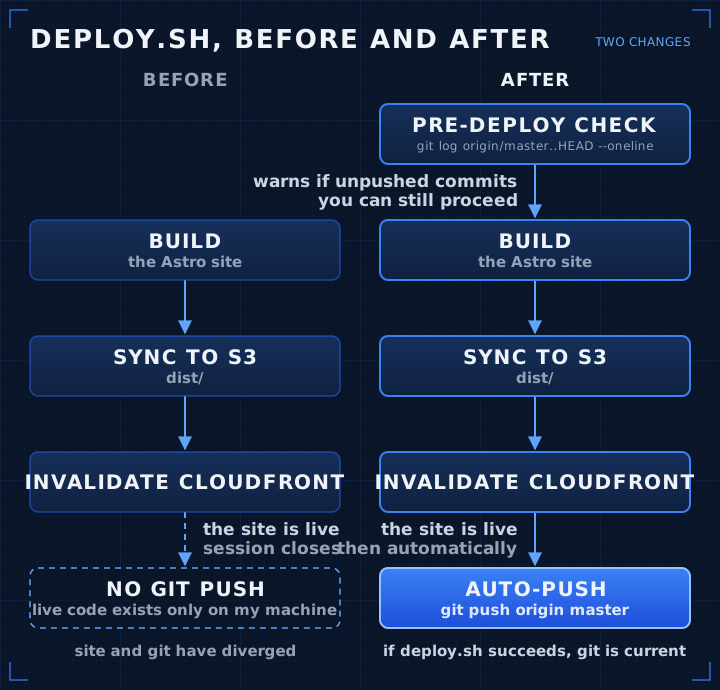
Now the invariant holds: if deploy.sh succeeds, git is current.
What I’d been missing was that “deploy” wasn’t one step. It was two. The visible one (site goes live) and the quiet one (repo reflects what went live). For a long time, the visible step was the whole mental model. I thought of “deployed” as the terminal state.
It wasn’t.
This is the same pattern that causes environment drift, stale configs, infrastructure running state that nobody wrote down. The code makes it to production. The record of what’s in production lags. You don’t notice until something breaks and the repo doesn’t have the fix. By then the gap is a mystery to debug, not an obvious omission to fill in.
I kept the pre-deploy warning optional to proceed past. Sometimes you want to ship a fix before the local commit history is clean. But the auto-push on success isn’t optional. If the deploy runs clean, git follows. No gap.
If your deploy pipeline produces a side effect worth having, make sure the pipeline captures it. Deploying without pushing is half a step. The half you skipped just isn’t visible yet.